Kubernetes + Docker Project
This is an oracle Kubernetes with Docker project walkthrough where I provide a live url.
Live kubernetes url:
http://129.80.220.168/
This is the public IP address provisioned by Oracle Cloud Infrastructure when Kubernetes created the LoadBalancer service. It is not a domain name yet, but it is a live, publicly accessible URL running on a Kubernetes cluster hosted on Oracle Cloud. Any browser in the world can reach it at this address.
Hosting sites like Pantheon are managed hosting, where everything is handled for you but you work within their limits. Kubernetes on Oracle is raw infrastructure where you control everything: how many servers, how they scale, what runs on them, how much it costs. More complexity, more power, no ceilings.
Screenshot 1: The Cluster
1. Top-left hamburger menu → Developer Services → Kubernetes Clusters (OKE)
2. Click your cluster name
3. The screenshot shows the cluster detail page with: cluster name, status "Active", Kubernetes version, and the API endpoint
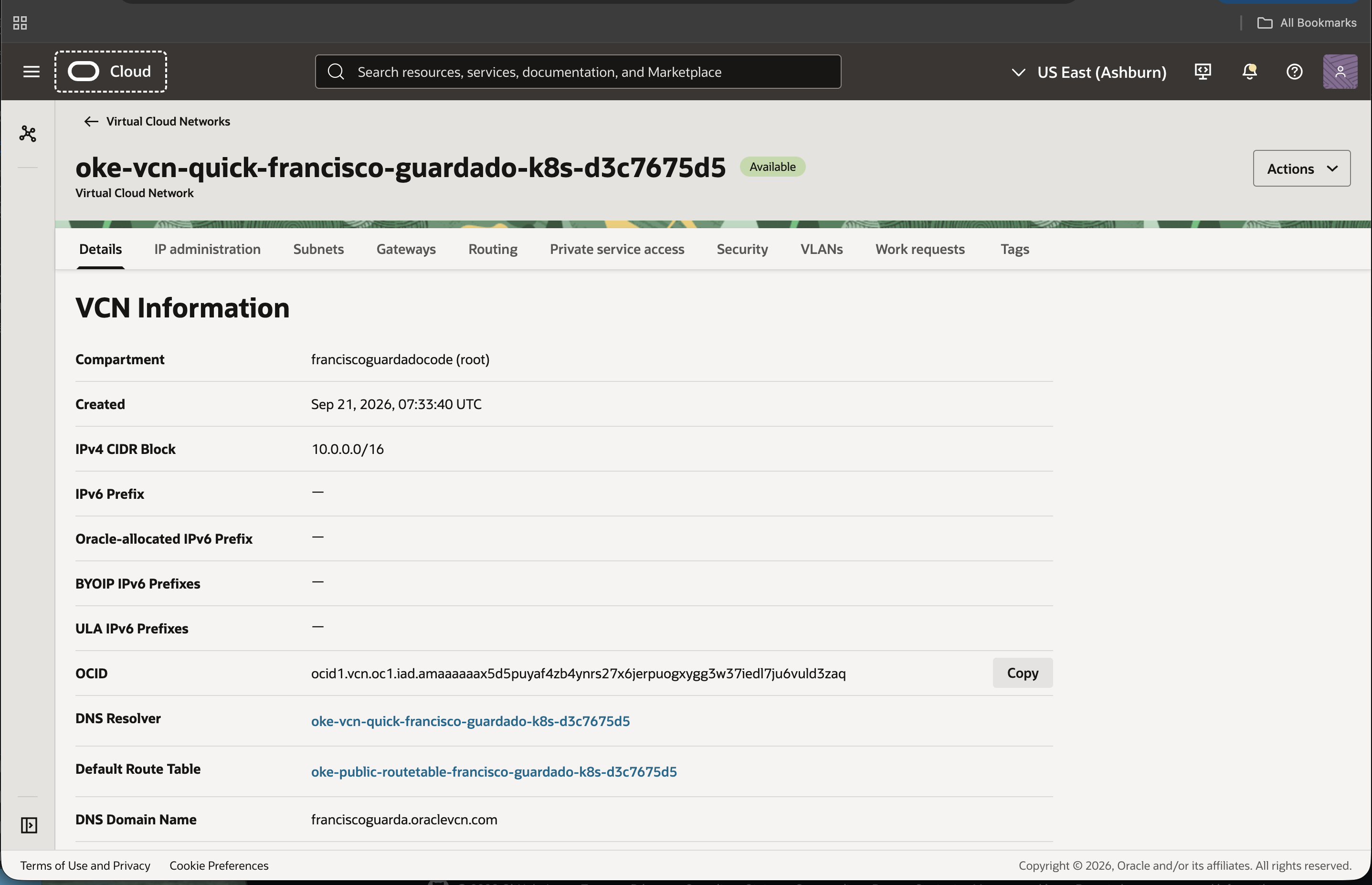
NEXT STEP:
1. Click the hamburger menu (top-left)
2. Click Developer Services
3. Click Kubernetes Clusters (OKE)
4. Click your cluster name in the list
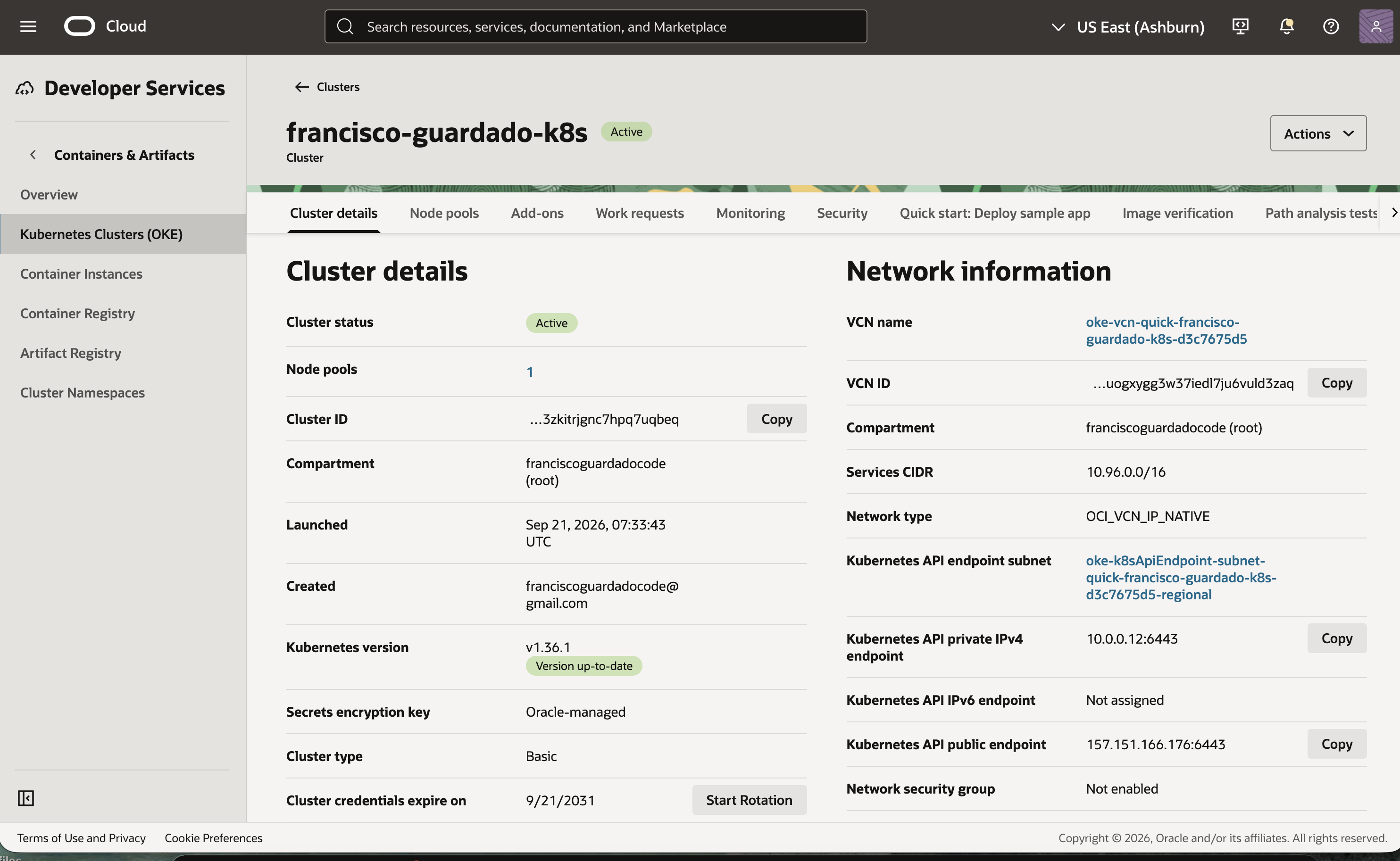
- Cluster name: francisco-guardado-k8s
- Cluster status: Active (green badge)
- Kubernetes version: v1.36.1, marked "Version up-to-date"
- Node pools: 1 (meaning 1 group of worker nodes is attached)
- Created by: franciscoguardadocode@gmail.com on Sep 21, 2026
- Cluster type: Basic (Oracle's free tier option)
- Network type: OCI_VCN_IP_NATIVE (pods get real VCN IPs, not a VXLAN overlay)
- Kubernetes API public endpoint: 157.151.166.176:6443 (this is what kubectl connects to)
- Cluster credentials expire: 9/21/2031 (5-year certificate)
This is your running Kubernetes cluster on Oracle Cloud, fully managed, version up-to-date, and accessible from terminal via the public endpoint.
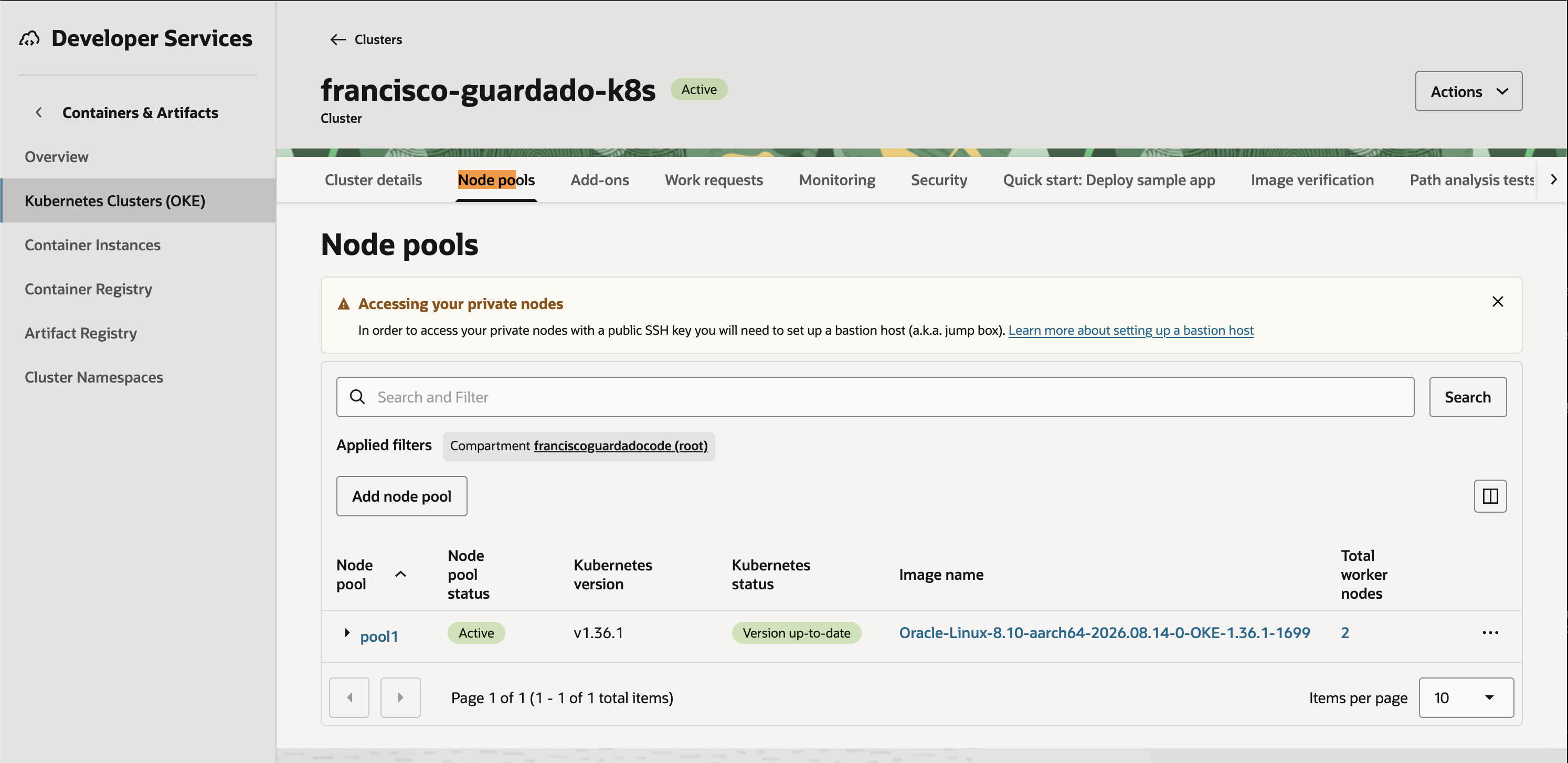
- Node pool name: pool1, status Active
- Kubernetes version: v1.36.1, "Version up-to-date"
- OS image: Oracle Linux 8.10, architecture aarch64 this means ARM (Ampere A1 processor, Oracle's Always Free shape)
- Total worker nodes: 2
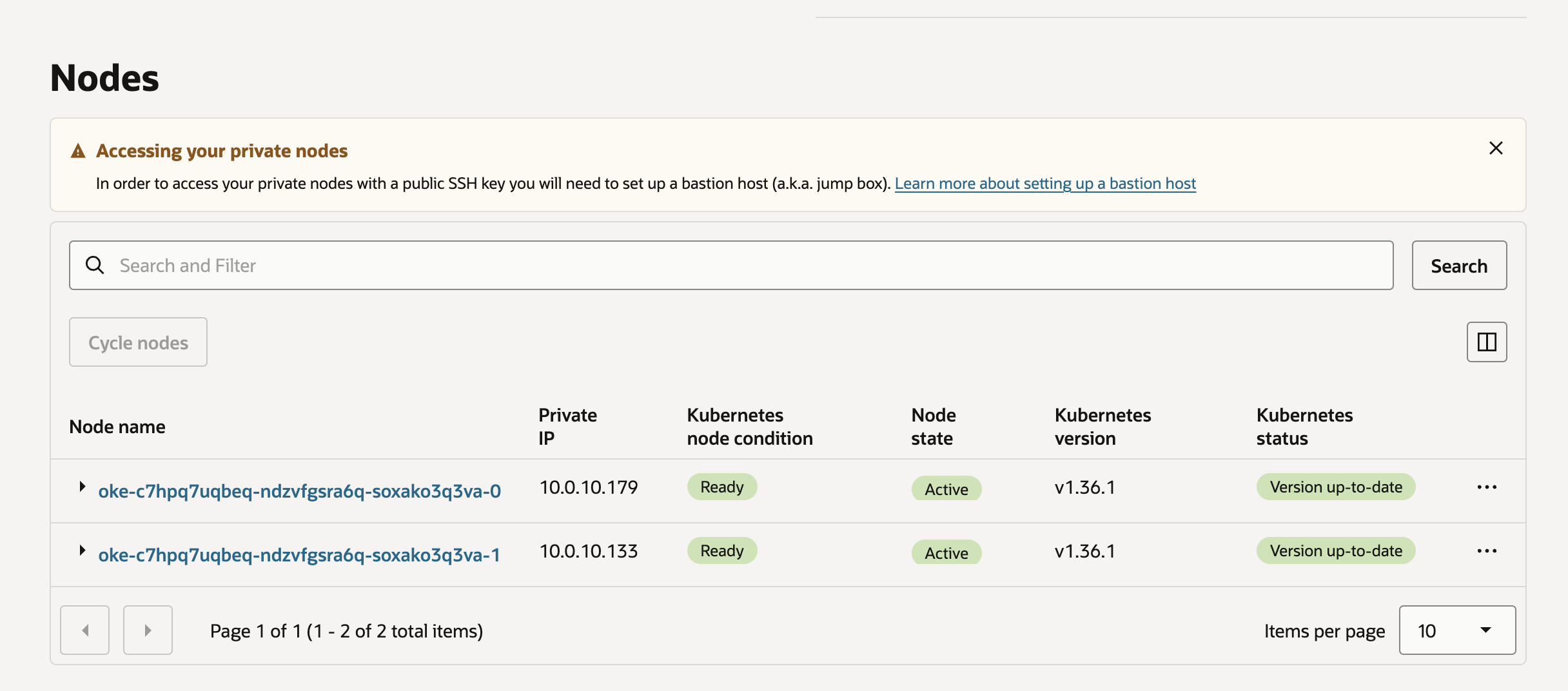
- 2 worker nodes listed by name, both with Kubernetes node condition Ready
- Node state: Active for both
- Private IPs: 10.0.10.179 and 10.0.10.133 (these are the actual servers running your containers inside the VCN)
- Kubernetes version: v1.36.1 on both nodes, "Version up-to-date"

- 2 nodes both with status Ready
- OS: Oracle Linux Server 8.10 on ARM64 (aarch64 architecture, Ampere A1)
- Kubernetes version: v1.36.1 on both
- External IPs: 150.136.40.168 and 129.213.48.179 (the nodes are publicly reachable)
- Container runtime: CRI-O (Oracle's chosen container runtime for OKE)


- 2 pods both with status Running and Ready (1/1)
- Each pod is running on a different node (10.0.10.133 and 10.0.10.179), meaning the app is distributed across both worker nodes for high availability
- Pod IPs: 10.0.10.234 and 10.0.10.128, real VCN-native IPs inside the private network
- 0 restarts on both pods, meaning the application has been stable since deployment
- Age: 13 hours of continuous uptime
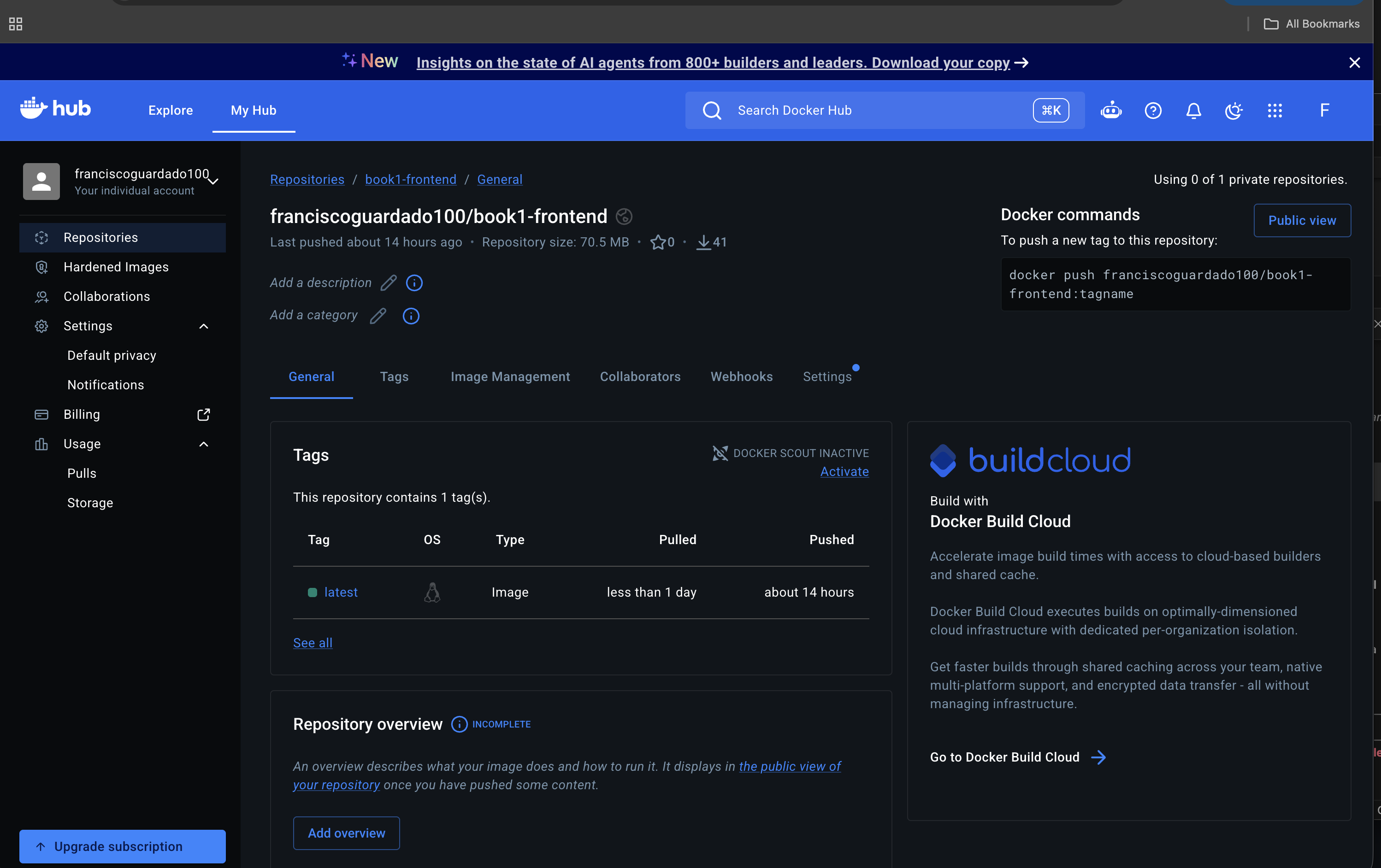
- Repository: franciscoguardado100/book1-frontend hosted on Docker Hub
- Image size: 70.5 MB (a lightweight production Next.js build)
- Tag: latest with OS type Linux (ARM, shown by the Tux penguin icon)
- Pushed: about 14 hours ago
- Pulled: less than 1 day ago (Kubernetes pulled it to deploy to the cluster)
- 41 pulls total, meaning the image has been downloaded 41 times (by both worker nodes across restarts and deployments)
This is the Docker image that gets pulled by every worker node in the cluster when deploying your app. It is the packaged version of your Next.js frontend, built and pushed to Docker Hub so Kubernetes can download and run it.